SysInfo WAB File Recovery Tool Free
Restore Windows Address Book Files on any Windows Version at Zero Cost.
*SysInfo WAB Repair Tool is a Fully Secured Software to Download.
Restore Windows Address Book Files on any Windows Version at Zero Cost.
*SysInfo WAB Repair Tool is a Fully Secured Software to Download.
SysInfo WAB File Repair Software is now completely FREE!
All necessary features of this software, previously locked behind a license, are now available for free permanently!
Steps to Get Your License for Free
We'll soon send you:
The posted review helps to improve our softwares and assists in making correct decisions. We appreciate the support and look forward to hearing about your genuine experience with SysInfo Software.
Scenarios Where the WAB Repair Tool is the Best

If your .wab file is inaccessible, corrupted, or damaged, you can retrieve your contacts using WAB File recovery software. It processes directly on your system, so nothing is uploaded to the web and your contacts never leave the computer. During the recovery process, the software will preserve the metadata and associated details of your business-critical contacts.

By using both standard and advanced recovery modes, the software fixes the WAB file and retrieves all deleted contacts from it. Sysinfo WAB File Recovery Tool is user-friendly, making it easy for anyone, regardless of their technical skills, to use. Plus, it's quite speedy at recovering deleted data from damaged WAB files.

Sysinfo WAB File Recovery Tool can recover damaged WAB files from both Outlook Express and Outlook. It safely repairs corrupt WAB files without altering the original files or system drive, ensuring secure data recovery under all circumstances. It is capable of effectively addressing both minor and major levels of WAB file corruption.
Most Recommended Tool to Repair WAB Files Without Risk of Loss At Anytime.

Restoration of Impaired, Unreadable Data
The WAB recovery software supports identifying and restoring unreadable data, including contacts and relevant information, from corrupt WAB files. Proficient in restoring the maximum possible number of contacts from WAB files while effectively fixing high levels of corruption.

Two Operational Modes for Contact Recovery
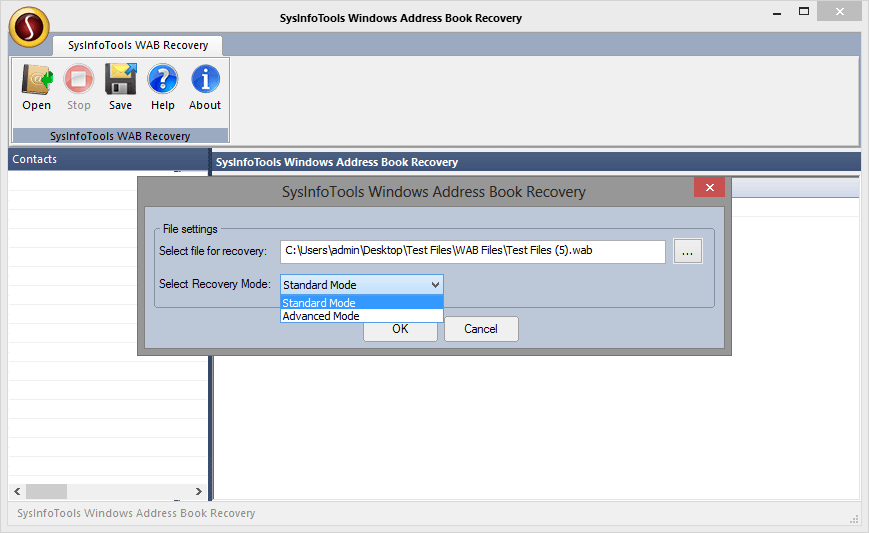
The software employs dual recovery modes, and Advanced Mode, to perform WAB file recovery. Standard mode recovery is used to fix moderate corruption issues, while advanced mode can fix severe corruption in WAB files without impacting the contacts.

Dual Outlook Program Support
This software offers dual support to fix corrupt WAB files of both popular email programs, i.e., Outlook Express and MS Outlook. It operates in a very safe mode without causing any damage to the original WAB files and system drive.

Save & Preview Option
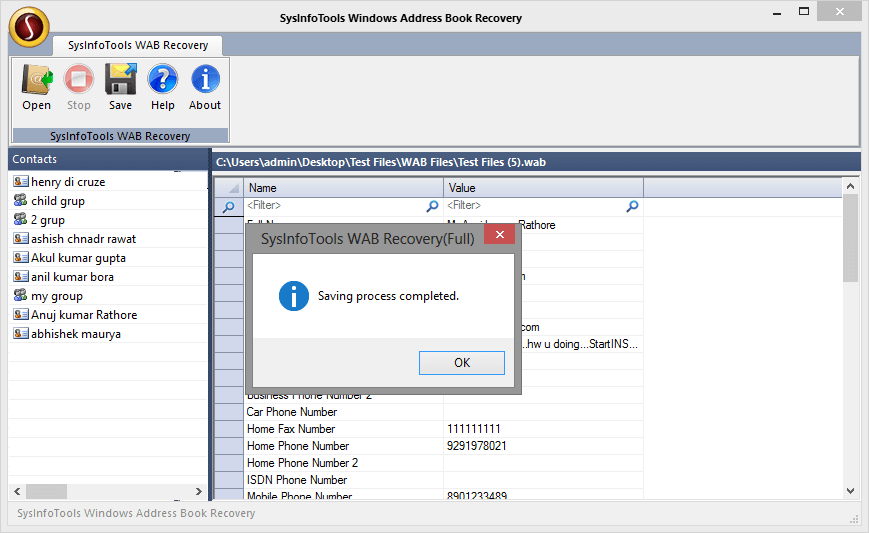
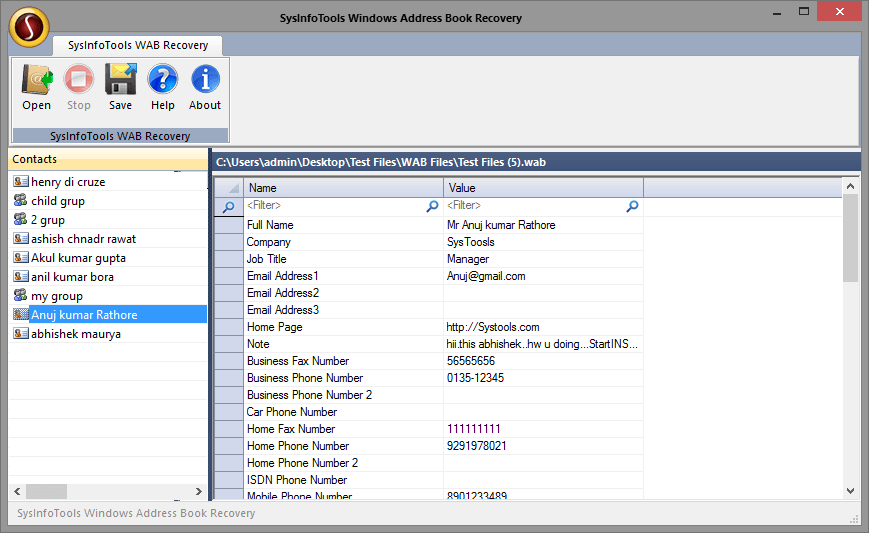
The software enables users to save all their recovered data in VCF file format. Before saving, the inbuilt preview feature enables users to get a preview of recovered data by double-clicking on each contact.

Automatic Update
WAB recovery makes the whole conversion experience extremely convenient by offering up-to-date software updates. Whenever the software is augmented with new features, you will get a timely notification via internet connectivity. For minor updates, no need to go through any extra formality, but you have to register for a major version upgrade.

Intuitive Software
It is an easy-to-use application that does not require any prior technical knowledge; thus, any novice and computer professionals can use this software with utmost ease. Any names, emails, phone numbers, and any notes attached to your address book come back intact, not as stripped-down text during the save. Get your full recovery for free the very first time on any Windows version.
Go through the specifications of this SysInfo WAB File Recovery Tool Free so you can install it quickly.

| Version: | v1.0 |
| Size: | 2.7 MB |
| License: | Multiple Users |
| Release Date: | 13 August 2026 |

| Windows Processor: | Intel® Core™2 Duo E4600 Processor 2.40GHz |
| RAM: | 4 GB (8 GB Recommended) |
| Disk Space: | Minimum Disk Space - 1 GB |
| Supported Windows: | 11, 10, 8.1, 8, 7, 2008, 2012 (32 & 64-bit), and other Windows versions. |

| Post a review for the software and get lifetime access for free. |
SysInfo's Award-Winning Software, Highly Rated by Experts in the Best Category



Get to know the WAB Repair Tool better with common concerns from users.
Ans: Yes, by using this software, you can save all your recovered data in a VCF (vCard Format) file. Before saving them, you can view a preview of the recovered data by double-clicking on each contact.
Ans: Bad storage sectors, abrupt system shutdowns, forced application closures, faulty add-ins, inconsistent upgrades, oversized files, concurrent limits, and ransomware or malware are reasons for corruption that damage the WAB files and demand their fix.
Ans: You can review on Software Suggest, Software Informer, Soft112, Updatestar, Trustpilot, Goodfirms, CNet, TechRadar, TechTarget, and similar platforms.
Ans: On Windows XP 2000, you can locate it on: C: Documents and Settings YourUsername Application Data\Microsoft Address Book, and on Windows 7 and later at C: Users YourUsername Contacts. .
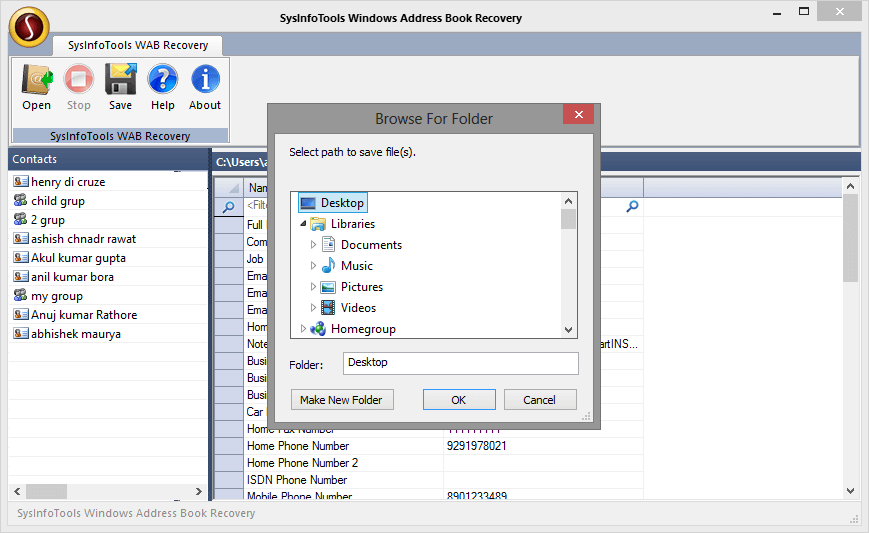
Ans: You can save your resultant repaired WAB files in an existing or different folder by creating a new one and naming it of your choice.
Verified Customer Reviews for the SysInfo WAB Recovery Tool
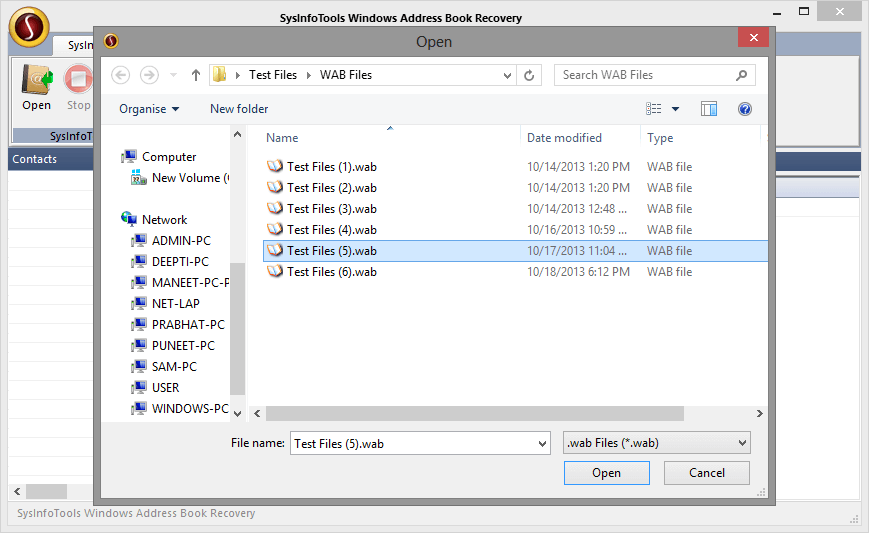
Step 1: Click Open and select the corrupt WAB file from the system.
Step 2: Now select the recovery mode: Standard or Advanced.
Step 3: Within a few seconds, the scanning process is completed.
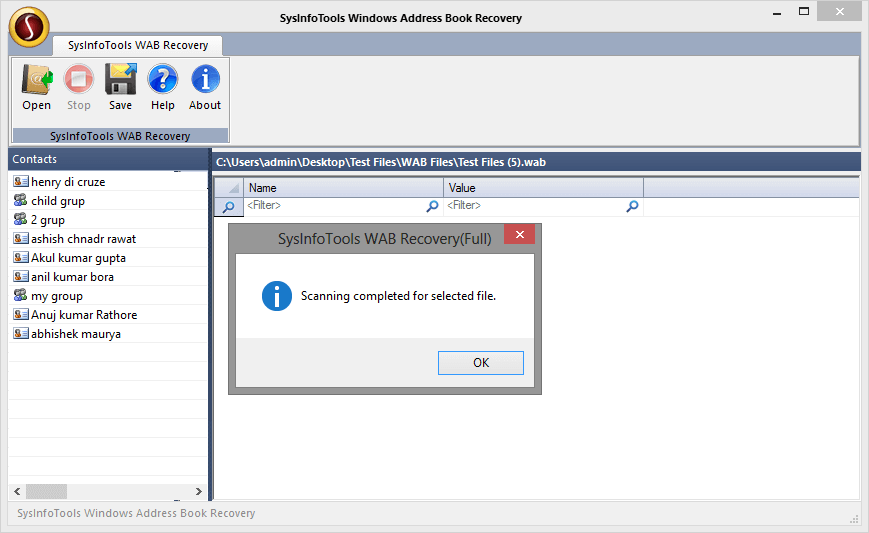
Step 4: Now click on contacts to check their preview. Click Save.
Step 5: Select any location on your system to save the recovered contacts. Click OK to start the saving process.
Step 6: Within a few seconds, the saving process is completed.