SysInfo EML Viewer

Free software to Open, View, and Save EML Files Smoothly.

  (Average Rating 4.5 Based on 1714 rating)
  • Allows users to add and read multiple EML files of different sizes.
  • View email text, subject, date, from, and attachments in the preview panel.
  • Save EML files to PDF, PST, and other formats to read emails effortlessly.
  • Compatible with EML files generated by any EML-supported email client.
  • Use this software on all Windows OS versions, current and previous versions.

*SysInfo EML Viewer Fully Secured Download Version.
1M+ Downloads
190+ Countries Worldwide
15+ Years Experience

Benefits of the EML Document Viewer

Discover the key features of the EML Reader wizard to read and convert EML files effortlessly

When to Use the EML File Reader?

Learn the scenarios where using the EML Viewer software is a prominent choice for users.

Easily View EML Files

Easily View EML Files

Accessing EML files without an EML-supported email client is a challenging task. Instead, SysInfo EML Viewer Freeware is a reliable technique to easily open and read EML file data created by any email client, such as MS Outlook, Thunderbird, and more.

Preview All the Email Data

Preview All the Email Data

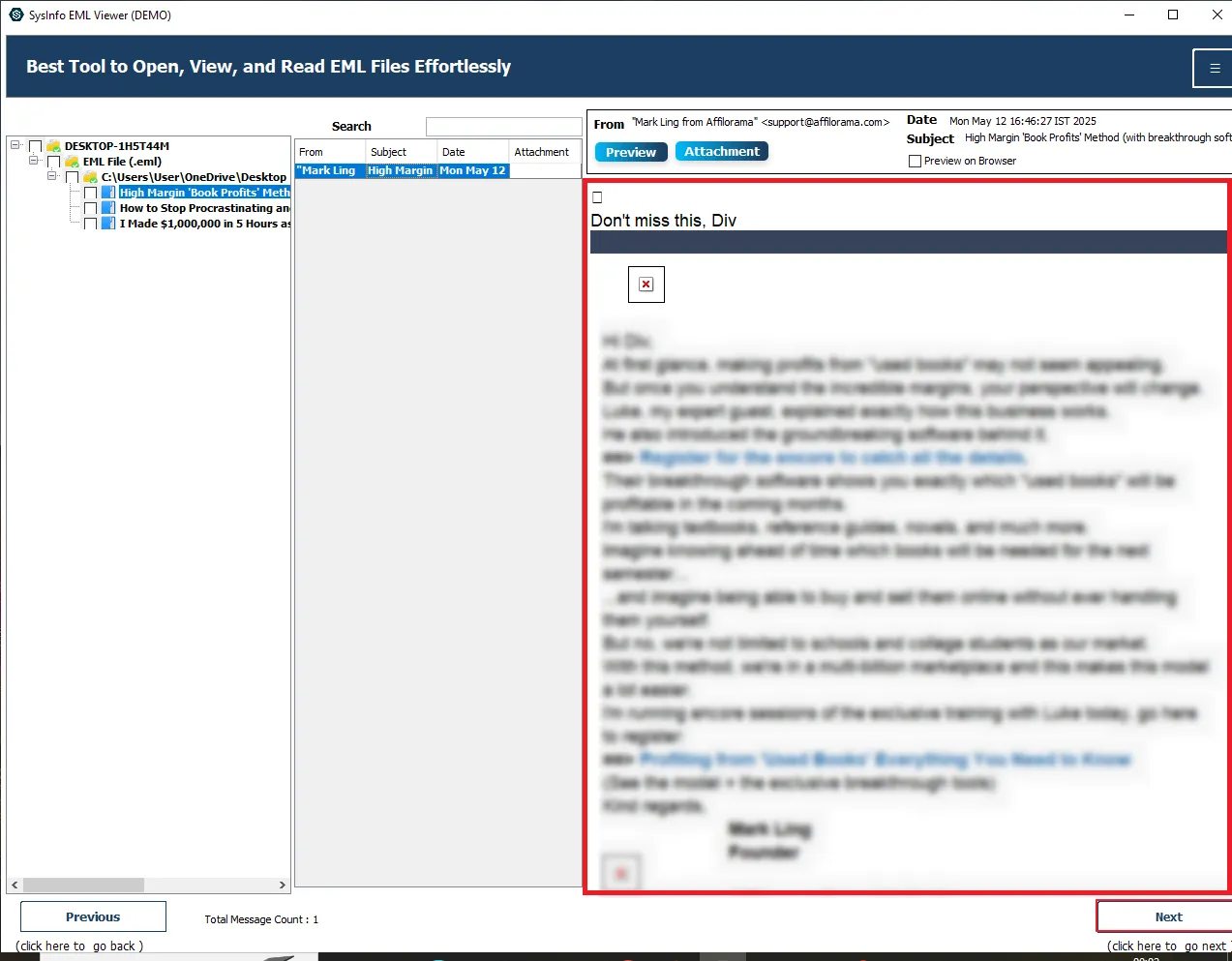
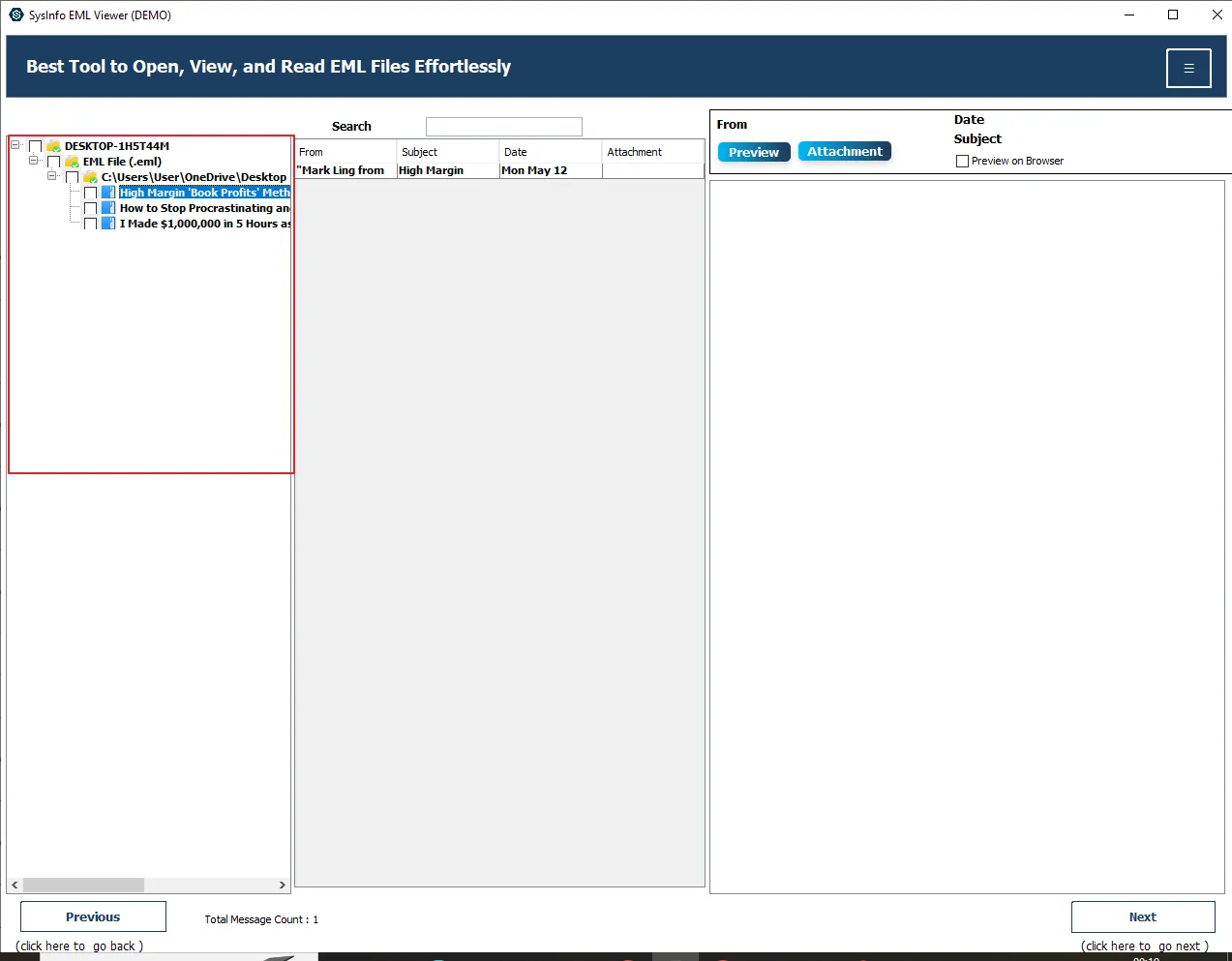
With the help of this utility, users can easily view information of each EML file, including To, From, Subject, Email Text, and attachments. Due to its user-friendly interface, it is convenient and easier to use without having any technical expertise.

Option Save EML Files

Option Save EML Files

You can choose to save all the EML files into multiple file formats to access them from anywhere freely. The process of conversion is simple, efficient, and secure. It also keeps the folder hierarchy intact, whether exporting single or multiple EML files.

Significant Features of the SysInfo EML File Viewer

Detailed Features of the EML Reader Software to read and export EML files with

Add Multiple EML Files

Add Multiple EML Files

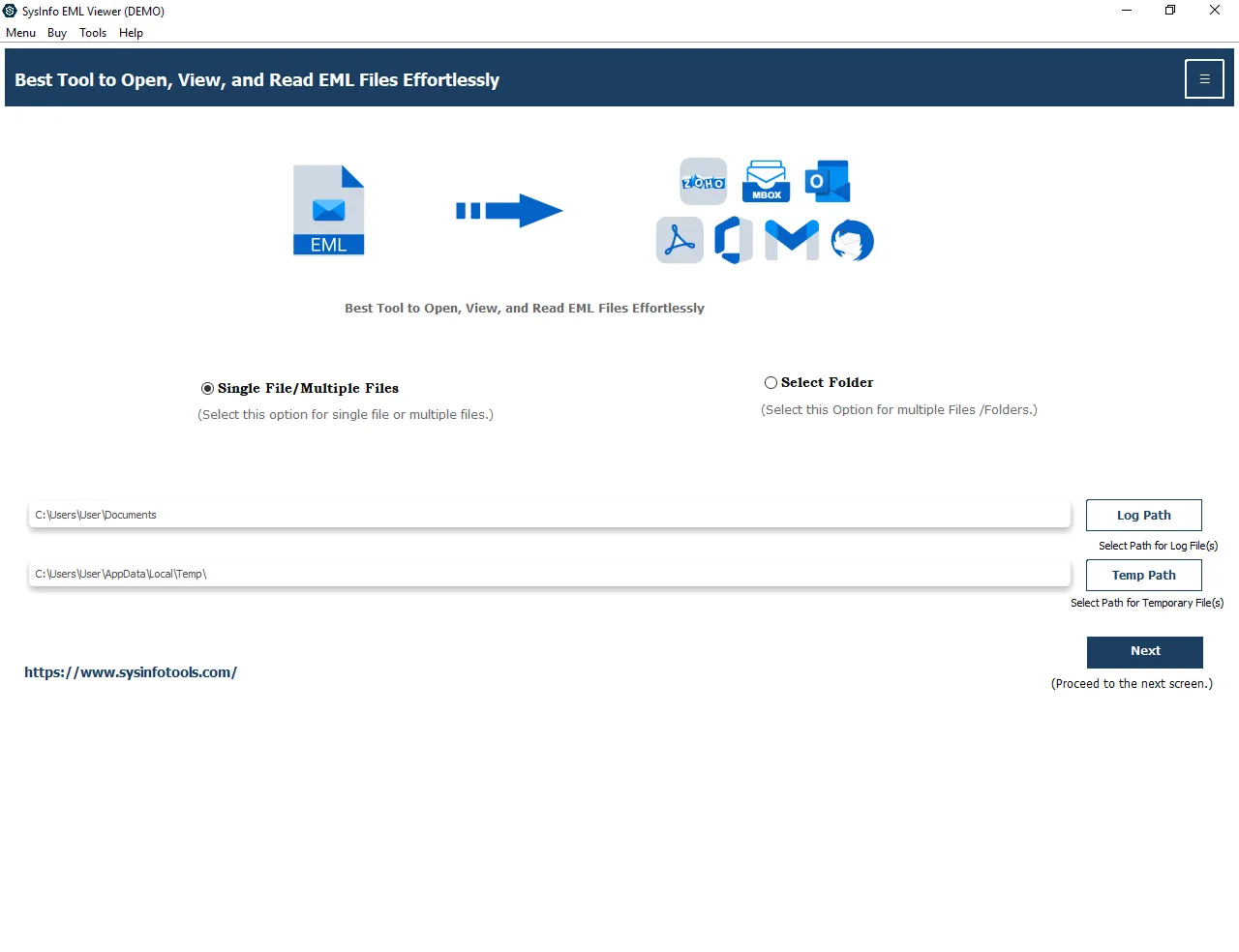
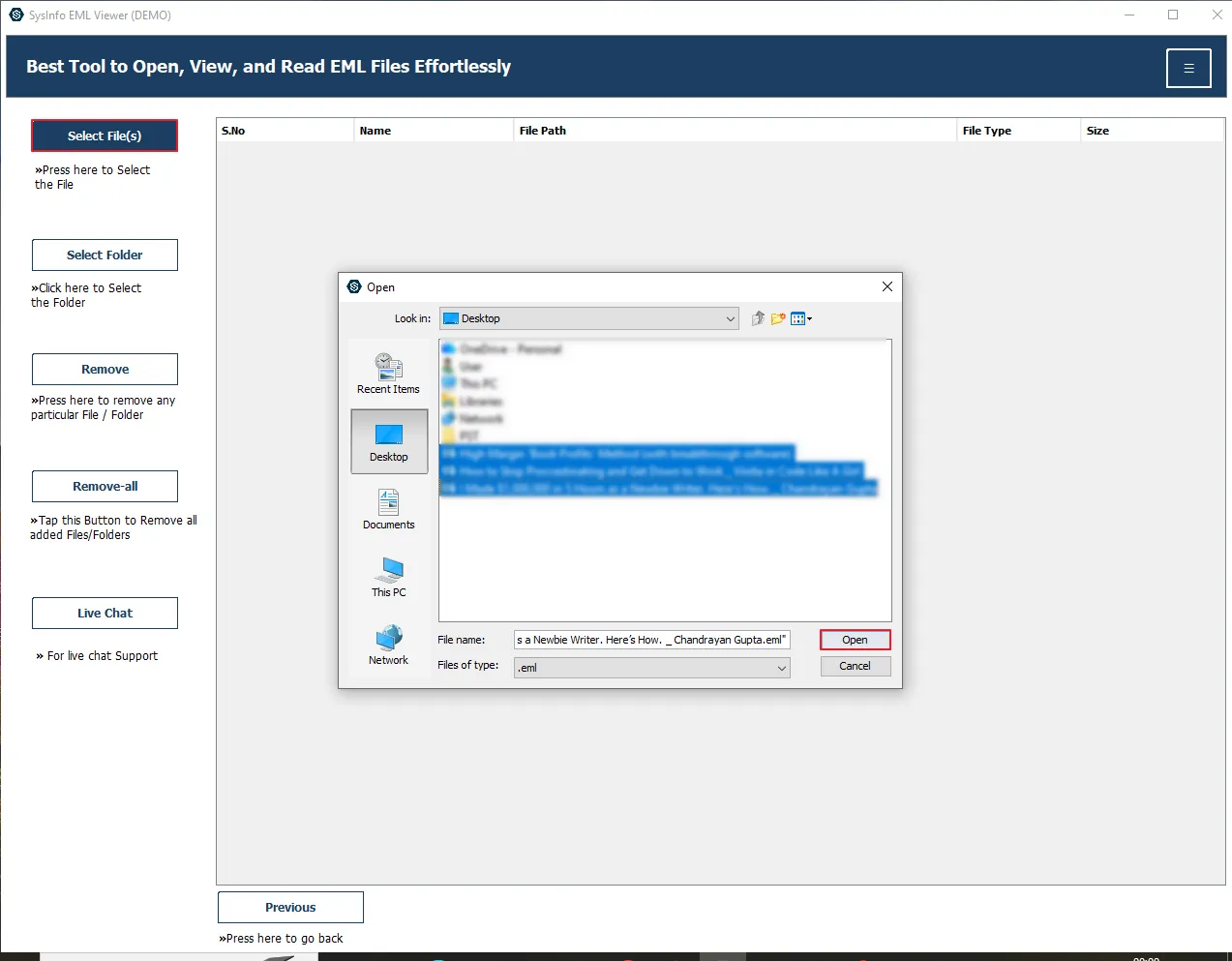
SysInfo EML Opener helps users add multiple EML files using the Select File(s) or Select Folder options. In Select Files, you need to select an individual file. On the other hand, Select Folder can add multiple files at once if the folder contains EML files.

Show All the EML File Data

Show All the EML File Data

This advanced utility displays all the data from the added EML files in the tree hierarchy. Here you can select the items and preview them in the preview panel. You can view all the items for free without worrying about file size.

Preview EML File Content

Preview EML File Content

Use this EML Format Viewer to open and read all the EML files data, including To, From, Subject, Date, Email Body, and Attachments. There will be no size issue in accessing these files.

EML File Conversion

EML File Conversion

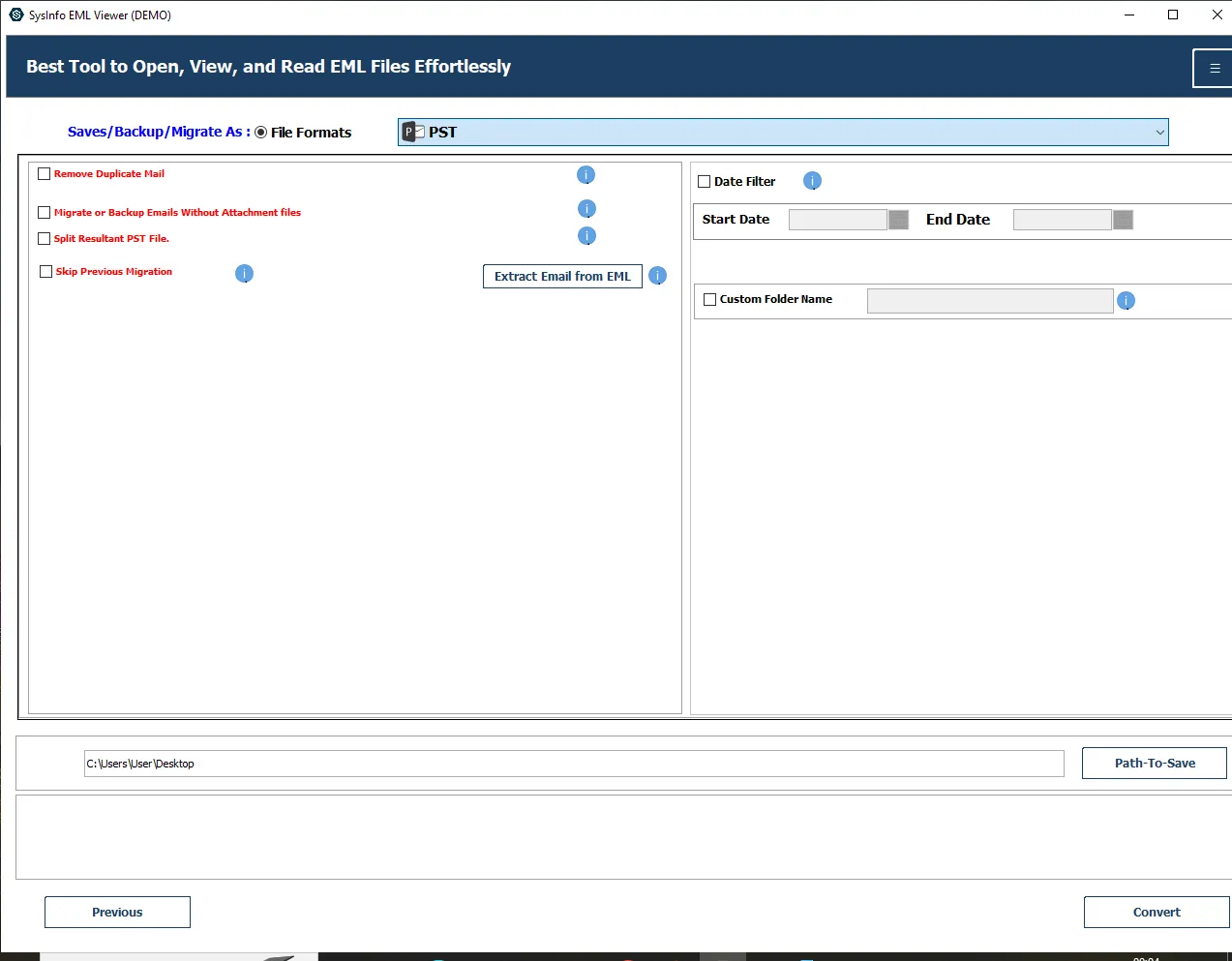
This proficient utility allows users to view and save EML files into multiple formats. It includes PST, MBOX, EML, EMLX, MSG, DOC, PDF, Thunderbird, CSV, XLSX, OFT, and WDSEML.

Remove Similar Emails

Remove Similar Emails

Using this reliable utility, you can choose to save EML files without duplicate emails. It detects and eliminates emails based on To, From, Subject, Body, and Cc. Besides, the process will be done without losing the original folder hierarchy.

Deal With Attachments

Deal With Attachments

This multi-functional wizard manages the attachments effectively. You can choose to convert emails without attachments. Other than this, save all the attachments separately and convert the attachments in PDF format when you convert EML to PDF.

Skip Migrated Data

Skip Migrated Data

This is the best free EML Viewer Tool to open and read EML file data. You can use the skip previously migrated feature to exclude the data that is already migrated, to avoid redundancy.

Extract Email From EML

Extract Email From EML

Using this user-friendly EML Message Viewer utility, you can easily extract email from the selected EML files. The process will be simple, efficient, and without any risk.

Advanced Date Filter

Advanced Date Filter

This reliable software offers a date filter feature to convert emails from the selected timeframe. To use it, you need to set the start and end dates, and then the tool will migrate emails between the mentioned date range without any hassle.

Break Large PST Files

Break Large PST Files

This software provides a split large resultant file feature to divide the large-sized PST files when you convert EML to PST. However, the data integrity will be maintained throughout the conversion process.

Desired Name and Path

Desired Name and Path

With this EML Viewer Freeware, you can assign the desired name to the output folder. It also allows you to set the required location to save the resultant file. Additionally, it offers a Naming Convention feature to set the name according to the provided format.

Useful for Windows OS

Useful for Windows OS

You can use the EML Viewer software on different Windows operating systems without any difficulty. It includes the latest Windows 11, Windows 10, Windows 8, Windows 7, and so on. Additionally, the speed and process will be efficient on all versions.

Software Specifications

Follow the technical requirements and specifications of the SysInfo EML File Viewer for smooth operation.

product Icon
About Product
Version: 25.11
Size: 285 MB
Release Date: 11 November 2025
Edition: Home, Administrator, Technician, and Enterprise
  
product Icon
System Requirement
Processor: Intel® Core™2 Duo E4600 Processor 2.40GHz
RAM: 8 GB (16 GB Recommended)
Disk Space: Minimum Disk Space - 512 GB
Supported Windows: 11, 10, 8.1, 8, 7, 2008/2012 (32 & 64 Bit), and other Windows versions.
product Icon
Demo Version
The free version of the EML File Viewer Tool enables users to explore all the features and functionalities of the software. You can open, view, and read unlimited EML files for free. It also allows users to convert 50 emails per folder. However, you must upgrade to the premium version for full and unrestricted conversion.
product Icon
Additional Information

Quick Tutorial for EML Message Viewer Software

Follow these simple steps to access and read EML files easily.

Awards and Reviews

SysInfo's Award-Winning Software Recognized by Experts- Highly Rated in the Best Category

Google
  4.2/5
Trustpilot
  4.6/5
capterra
  4.7/5

SysInfo EML Viewer Pro Demo and Full Version Comparison

Compare the features available in the free and paid versions of the tool for efficiency.

Product Features Free Version Full Version
Access and View EML Files
Add Multiple EML Files
Convert EML to PDF, PST, MBOX, etc. 50 Emails Per Folder All
Support Bulk Conversion
Duplicate Eliminator Feature
Keep Attachments Separately
Conversion without Attached File
Saving Attachments as PDF
Avoid previously transferred Data
Extract Email From EML Feature
Save Particular Email
Customised Name and Location
Divide Large PST File
Support all Windows OS versions
24*7 Tech Support & 100%
Money-Back Guarantee

Why Choose SysInfo Software?

SysInfo is highly recommended for its robust security and reliability. It features an easy-to-navigate interface that allows users to view email data effortlessly without needing to install any email clients. It supports converting email files into various formats and offers advanced filters like date-range selection and duplicate removal for customised output. So, the businesses manage email data efficiently, contributing to smooth operations and growth.

Visit our Chat Support 24*7 for any information or query.

Frequently Asked Questions

Some of the generally asked user queries and their related solutions

Ans: To do this, all you need to do is follow the steps below:

  • Download and launch the SysInfo EML Viewer Tool.
  • Click Select Files/Select Folder to add EML files from the system.
  • All the selected files will be displayed in a tree hierarchy.
  • Choose the item from the folder hierarchy to view it in the preview panel.
  • To convert the EML files data, hit Next -> choose file format -> tap Convert.

Ans: No, there is no size limitation for EML files. You can open EML files of any size, including large and bulky files.

Ans: No, there is no need for an EML-supportive email platform to open or view the data of EML files.

Ans: Yes, you can easily access and read all the data of EML files, including attachments.

Ans: Yes, this utility helps to preview and convert them into multiple file formats for future purposes.

Ans: This software enables users to convert EML files to 8+ file formats, including PST, PDF, MBOX, MSG, CSV, DOC, and more.

Ans: Yes, the EML Viewer tool will keep all your data safe and intact while you preview or convert.

Ans: You can use it on all Windows OS, including current Windows 11 or earlier versions, like Windows 10, Windows 7, Windows 8, and so on.

Ans: Both the free and paid versions offer the same features and functions, but the free version allows users to view unlimited files and convert 50 Emails per folder. For more conversions, you need to upgrade to a paid version.

Our Clients Review

Read what our clients say about their experience with our SysInfo EML Viewer Tool.