-
Written By
Deep Shikha -
Approved By
Sonika Rawat -
Updated on
February 11th, 2026 -
Read Time
7 minutes
Best Ways to Open Corrupt ZIP Files Without Data Loss
“I downloaded a .zip file recently and stopped it in between at around 85%. I guess it made the download link corrupt, and now my files are stuck in the corrupted ZIP. It contains some important PDF and Word files and image attachments. I guess retrieving them entirely is a bit difficult, but I want to try and extract the maximum data I can without loss. Suggest suitable ways.”
-Andrew Philips, California
ZIP files are used to make data storage and transfer easy, especially those containing large data volumes. But what if it gets corrupted? Then, how will you open corrupt ZIP file throwing CRC errors, incomplete extractions, and blocking your access to critical documents? To prevent many more inconsistencies and the risk of data loss, this guide explains effective ways for the repair, including SysInfo Zip Repair Tool for quick and optimal results.
What Causes ZIP File Corruption?
To understand how you can open damaged zip file, first identify what it is and why the zip file is corrupted.
ZIP File: A digital container bunding one or more files and folders in small packages for archival or compression. ZIP files have universal support for all versions of Windows, macOS, and Linux systems, and can be password-protected/encrypted to keep the sensitive data secure. It is most commonly used in email attachments, downloads, and for backups.
The probable reasons for ZIP file corruption are:
- Interrupted file downloads and uploads
- Incomplete data transfer over unstable connections
- Bad or damaged sectors on the storage devices
- Sudden system outages during file compression
- Interferences by viruses, malware, and other threats
- Oversized ZIP files or those split incorrectly
- Unverified data storage and unreadable archives
Note: WinZIP allows storing a maximum file of 2 GB.
How to Open Corrupt ZIP Files Without Data Loss?
This section elaborates on all available free methods and dedicated software for the removal of corruption from ZIP files. It also states the advantages and limitations of these methods for appropriate decision-making, whether you are an individual, a business, an IT admin, or an enterprise.
Conventional Methods to Open a Corrupted Zip
There are multiple free methods available for the manual fix of the corrupted ZIP files. However, they may not be an absolute solution. Let’s go through each one of them one by one.
#1: Using Windows Built-In Utility
Windows Explorer has ZIP corruption handling capabilities, but upto a limited extent. The steps you can follow are:
- Right-click the ZIP file on your OS and click Extract All.
- Then, select a location on your PC and let Windows perform the extraction.
It may extract partial but usable files even if the ZIP header is corrupted. For single-flie ZIPs and minor corruption, this may work.
Note: Here, you can also use 7-ZIP for forced extraction by selecting the ZIP and clicking Extract files.
When It Fails?
- When the archives are damaged severely
- Control over selective recovery isn’t available
- Files are skipped without any warnings
#2: WinRAR Open Corrupt ZIP File
WinRAR is an effective method to open RAR files as it has a repair option. Steps are:
- Open WinRAR and move to the folder with your corrupted ZIP files.
- Then, select your file and click on Tools.
- Next, press Repair Archive and wait for the fix.
- Finally, choose a destination for your repaired ZIP and click OK.
It is a good solution to reconstruct the central repository of the ZIP file.
When It Fails?
- You need to get WinRAR on the system, and also its version must be 7.13 or higher.
- You need technical knowledge to know about WinRAR and its functioning.
#3: Open Broken Zip File by Commands
Command-line is another free approach to fix and access the ZIP file contents. Follow these steps:
- Open cmd as an admin and navigate to the folder with your ZIP files.
- Then, run the command: tar -xf corrupted.zip.
- It will fix the broken ZIPs so that you can access the data.
Note: On the latest versions of Windows OS, tar may sometimes bypass the minor ZIP structural issues.
When to Not Use?
- If you are from a non-technical background or a novice user, it can be complex.
- It provides no detailed logs for the recovery of corrupted ZIP files.
- No preview is available, and it often fails on CRC-corrupted files.
Trusted Method to Open Corrupt ZIP Files
When none of the above methods seem reliable, then download the SysInfo ZIP Recovery Tool. A smart and dependable solution to quickly recover ZIP files created by any ZIP utility on your Windows OS. It extracts files securely and with 100% accuracy from the corrupted and damaged ZIP files without data misalignments. Additionally, it even supports CRC repairs and ZIP of both 32-bit and 64-bit. Moreover, the software works rapidly and has a Demo Version, which only enables a preview of your data files.
Steps to Open Corrupted Zip Without Loss
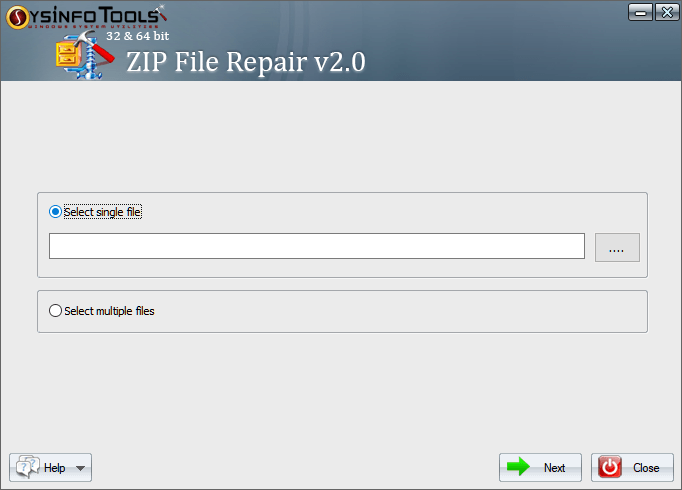
- Run the ZIP File Repair Tool and add single or multiple files. Tap Next.
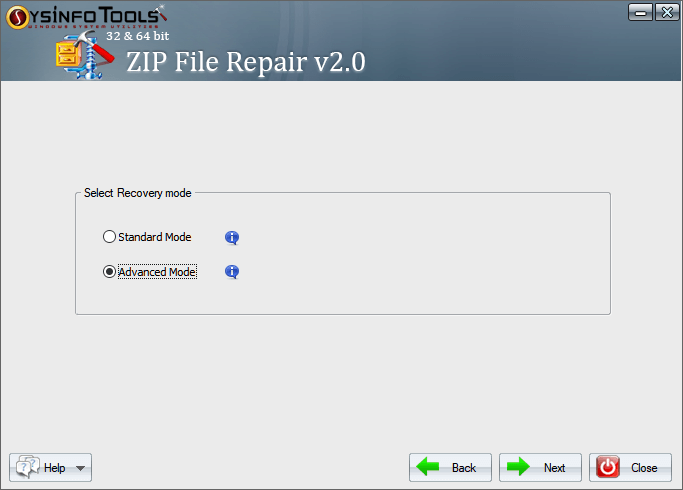
- Then, choose Standard or Advanced recovery mode and click Next.
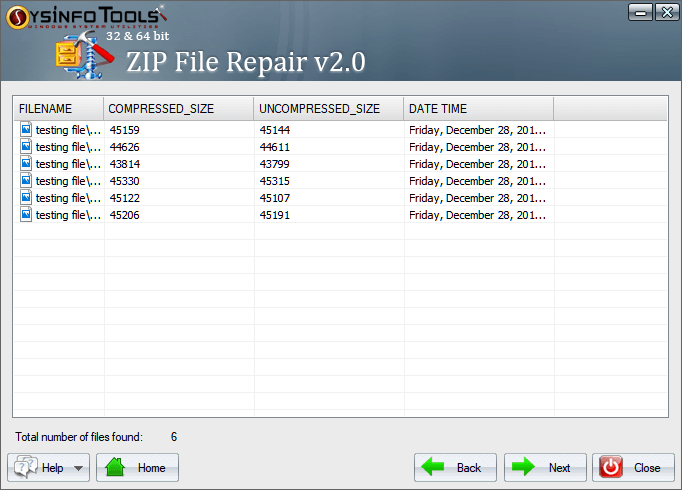
- Further, check the restored files and click Next after the preview.
- Click (…) and choose a destination path and filter to save in the original form.
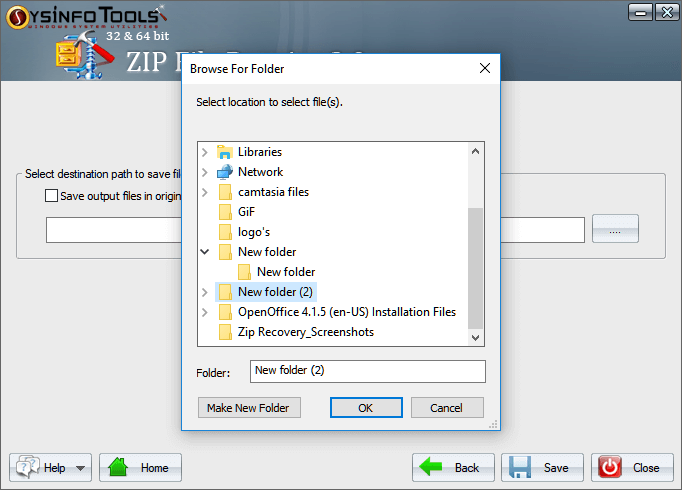
- Finally, click Save and wait until the files are recovered and saved. Tap OK.
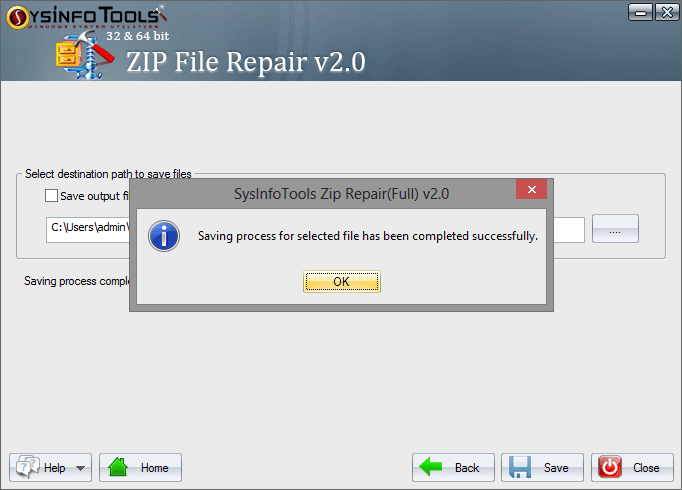
This is an ultimate solution because it helps repair ZIP file headers, recover files even with broken directory structures, and preserves everything while handling large archives. In all, it is an excellent choice for all users, whether with minor or severe ZIP file corruption.
Conclusion
A corrupted ZIP file doesn’t necessarily mean it has lost data. If you have the right approach, your content is still recoverable. The manual methods, including Windows tools, WinRAR, and the command line, can only fix minor issues and partial damage. For severe corruption fix, use the dedicated SysInfo ZIP Fix Tool to open corrupt ZIP files with high recovery success.
Frequently Asked Questions
Q1. How can I open a corrupt ZIP file without losing data?
Ans. To open damaged zip files without losing data, use the SysInfo ZIP Repair Tool. It ensures guaranteed data preservation and no alterations.
Q2. Can Windows open a corrupted ZIP file?
Ans. Yes, but only when the corruption is at a minor level. With CRC and directory records damage, Windows fails to open the corrupted ZIP.
Q3. Can I recover individual files from a broken ZIP archive?
Ans. Yes, you can open broken zip file and recover individual files from it with the help of excellent ZIP Repair Software by SysInfo.
Q4. How can I prevent ZIP files from getting corrupted in the future?
Ans. To ensure ZIP files do not get corrupted in the future, take these preventive measures:
1. Verify any downloads using the checksum command
2. Avoid file compression during a power outage or shutdowns
3. Transfer large ZIP archives only over a stable network
4. Split large archives into smaller ones and store them on healthy media
5. Scan your systems often to look for malware or viruses
About The Author:
Deep Shikha Pandey is a Tech Writing Expert having deep knowledge about Outlook, Gmail, Yahoo, SQL, and other databases and email clients. She will guide you the best about email migration and SQL Database recovery using her expertise and making all the processes a cakewalk for the readers. Make your technical journey easy with simple layman’s blogs and accurate technical information.
Related Post


