1. Overview

The Yahoo to PDF Converter backs up Yahoo mailboxes folders data into PDF format to local systems safely. It backs up multiple folders emails into PDF and other file formats at a time. Also, it provides different filters and reports of the whole conversion process.

Key Features:

  • A safe and reliable tool to Export Yahoo email to PDF file format
  • Allows converting the bulk of Yahoo mailbox emails into PDF format.
  • Apart from PDF files, you can also save Yahoo emails into other 25+ saving options.
  • Remove the Duplicate Mail option to exclude repetitive emails of chosen folders.
  • Option to preserve the folder hierarchy of Yahoo folders.
  • Mail Filter to separate emails between two date ranges.
  • It allows users to backup Yahoo folder's emails without attachments.
  • Set schedule backup of Yahoo emails on a daily, monthly, and weekly basis.
  • The software works on all the versions of Windows OS like 10, 8.1, 8, 7, etc.
  • Free Yahoo mail to PDF Converter enables users to export 50 items per folder.

System Requirement

  • Platinum Class Processor
  • Minimum Memory: 500MB RAM (1GB Recommended)
  • Disk Space: Enough space to store the recovered output
  • Windows: 10/8.1/8/7, 2008/2012 (32 & 64 bit)

2. User Interface

You will view the below-mentioned interface on your system when you run Sysinfo Yahoo to PDF Converter Tool.

User Interface

2.1 Button

About  About:- Click on this button to get detailed information about this software.

Help  Help:- Click on this to get help related to this software.

Buy  Buy:- Opt with this to buy the software.

Next  Next:- Click on this to move on to further steps.

previous  Previous:- Enables you to go back to previous steps.

path-to-save  Path To Save:- Press this to assign the saving location of a resultant folder.

Convert  Convert:- Click on this to convert Yahoo emails.

buy  Download Report:- It allows users to save the report of the conversion.

buy   Convert Again:- It permits users to initiate the conversion again.

3. Software Order

You can get complete approachability to the features of the tool after buying its full version. To get the utility, visit the Buy now page and proceed further with the purchase option. After composing a successful transaction, the full version of the SysInfo Yahoo to PDF Converter is now yours. Once the purchasing process gets completed, we provide you the activation key on the registered email id. With this key, you can quickly activate the tool. Get your full version of the Sysinfo Yahoo to PDF Converter by clicking on the Buy Now button.

5. Software Working

Download and Install the SysInfo Yahoo to PDF Converter

  • Step 1: Run the SysInfo Yahoo Mail to PDF Converter as an administrator.
    Step 2
  • Step 2: Enter Yahoo mail email address and third-party app password and click Sign In.
    Step 3
  • Step 3: The software shows you an interface containing Yahoo mailbox folders.
    Step 4
  • Step 4: Select the folders from the preview panel that you want to backup and click Next. (You can check for all the folders also)
    Step 4
  • Step 5: Choose the PDF option from the drop-down of the Yahoo to PDF converter wizard.
    Step 5
  • Step 6: Check these features if required:
    • Remove Duplicate Mail:- It helps to remove similar emails from Yahoo folders.
    • Maintain Folder Hierarchy:- To preserve the original structure of the chosen folders.
    Step 6
  • Step 7: Opt for these options:
    • Save Attachment Separately:- To save the attachments of Yahoo emails into a specific folder.
    • Convert Attachments to PDF format:- It allows you to save all attachments files into PDF format.
    Step 7
  • Step 8: You can also use these features:
    • Free up Server Space:- Use this to delete the emails after taking the backup.
    • Skip previously migrated items:- It helps to skip those emails if earlier backed up using the SysInfo Yahoo to PDF Converter.
    Step 7
  • Step 9: Mark the following features, if you need them:
    • If you need to backup only emails, then opt for this feature to migrate or backup emails without attachment files.
    • You can also set a backup schedule of Yahoo mails into PDF. It helps to fix the next date and time for Yahoo emails backup.
    Step 8
  • Step 10: Check the Mail filter option if you want to backup the selective emails between two dates.
    Step 9
  • Step 11: Go through with these choices:
    • Custom Folder Name:- check this and enter the name to save the PDF files of Yahoo emails.
    • Naming Convention:- Choose the desired saving format if needed.
    Step 9
  • Step 12: Now, click on the Path to Save button and choose a directory to backed-up the files.
    Step 9
  • Step 13: Click Convert to start the conversion of Yahoo emails into PDF format.
    Step 9
  • Step 14: Here, you can also opt to Start the migration early or Cancel all scheduled migration.
    Step 9
  • Step 15: Finally, hit on the download Report button to save the report of the process.
    Step 9

6. Installation

Software Installation Guide

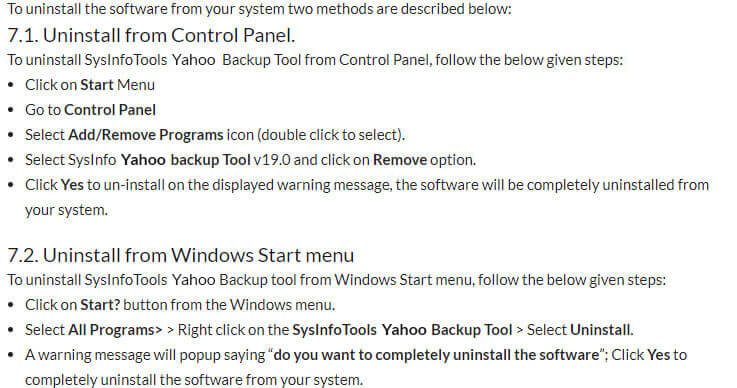
7. Uninstallation

Software Uninstallation Guide

9. Frequently Asked Questions

Yahoo to PDF Converter is designed with a highly interactive and self-instructive interface for technical and non-technical users. It doesn't require any prior technical expertise to handle this utility.

Yes. The software can efficiently work even without a license. But the free version can backup only 50 items per folder from the Yahoo mailbox to PDF.